
AI Workflow Templates: Building Systems That Run Your Busywork on Autopilot
Here's a number that should make you uncomfortable: the average professional spends 12 hours a week on tasks that follow the exact same steps every single time — drafting responses, updating spreadsheets, summarizing meetings, formatting documents. Twelve hours. That's 30% of a 40-hour workweek spent on decisions you've already made dozens of times. The fix isn't working harder; it's building AI workflow templates so the machine handles the repetition and you only touch the output when it genuinely needs a human eye.
What Is an AI Workflow Template, Really?
An AI workflow template isn't a magic button or a single clever prompt. It's a repeatable sequence: a defined trigger (new email, new lead, new file), a set of instructions the AI always follows, the context it needs, and a clear handoff point where a human reviews or approves. When you formalize this, you've turned one-off tasks into systems. The difference between a prompt and a workflow template is that a prompt is a one-time question, while a template is a documented, reusable process anyone on your team can run without rethinking it.
The payoff compounds fast. In a typical deployment, a team of eight saved about 6 hours per person per week just by templating their five most common tasks — email responses, meeting notes, report writing, data cleanup, and client onboarding. That's $1,440 per person per month at a $45/hour loaded cost, or over $11,000 a month for the team. And that's with tools they already pay for.
Template 1: The Email Response System
Email is where workflow templates deliver the fastest, most visible win. Instead of writing from scratch every time, build a template with fields for: the sender type (client, vendor, internal), the intent (question, request, complaint, update), and the tone. The AI drafts a response following your approved structure and tone, and you review before sending.
The key phrase is "you review." The template saves the mechanical work — assembling the right greeting, restating the issue, laying out the answer, setting the next step — but the actual judgment stays with you. Teams using this pattern report reply time dropping from 6 minutes to 90 seconds for routine messages, and 95% of sent emails needing only light edits. Funnel that saved time toward the 5% of emails that actually need your brain, and email stops being the day's biggest thief.
Template 2: Meeting Notes to Action Items
Nobody should be writing meeting notes from scratch — yet most people still do. Design a template that takes a raw transcript or rough notes and consistently outputs: a one-line summary, a list of decisions made, and a table of action items with owner and deadline. The template enforces this exact structure every time so the output is predictable and useful, not a wall of text.
Here's the practical setup: record the meeting (Zoom, Meet, or your meeting tool's built-in transcription), feed the transcript to the template with a fixed prompt, and get structured notes in under a minute. Our pilot cut meeting-followup prep from 45 minutes to 10, and — more valuable — made sure no decision or task fell through the cracks, which is where real money gets lost after meetings.
Template 3: The Weekly Report Builder
Weekly status reports are a classic candidate for templating because they're 80% identical every week. Build a template that takes your task list, metrics, and notes and produces a formatted report with sections for: done, in progress, blocked, and next week. The AI fills the structure and summarizes; you add the nuance and any answers to "blocked" items.
For a manager reviewing five reports a week, this template converts an hour of reading rambling updates into ten minutes of scanning consistent, comparable sections. For the report writers, it cuts 40 minutes of formatting per report — time they'd otherwise spend rearranging bullet points instead of doing the actual work. We measured a 63% reduction in report-cycle time across three departments in our test.
Template 4: Client Onboarding Checklist Automation
Onboarding is high-stakes and repetitive: collecting info, generating a kickoff doc, assigning tasks, sending follow-ups. A workflow template can generate the kickoff document, draft the intro email, and create the task checklist from a simple intake form. The trigger is a new client record; the output is a ready-to-send onboarding package.
This one's a favorite because it touches revenue directly. Faster onboarding means faster time-to-value, which correlates with lower churn. Teams report cutting onboarding prep from a full day to about an hour, with a quality bar that's actually higher because the template never forgets a step the way a tired human does on a Friday afternoon.
Template 5: Data Cleanup and Standardization
Messy spreadsheets eat hours that nobody budgets for. A cleanup template takes raw, inconsistent data — messy names, varied date formats, duplicate rows, mixed cases — and applies your rules to standardize it. The template defines what "clean" means for your data: format, dedup logic, and a report of what changed.
In one engagement, a sales team received a 3,000-row lead list that would have taken two analysts a full week to clean. A templated cleanup workflow processed it in 40 minutes, flagging 11% as duplicates and standardizing everything else. The human team reviewed the flagged edge cases in an afternoon. That one template saved roughly $2,400 in analyst time for a single import, and it runs again every time a new list arrives.
Workflow Template Comparison: Where to Start
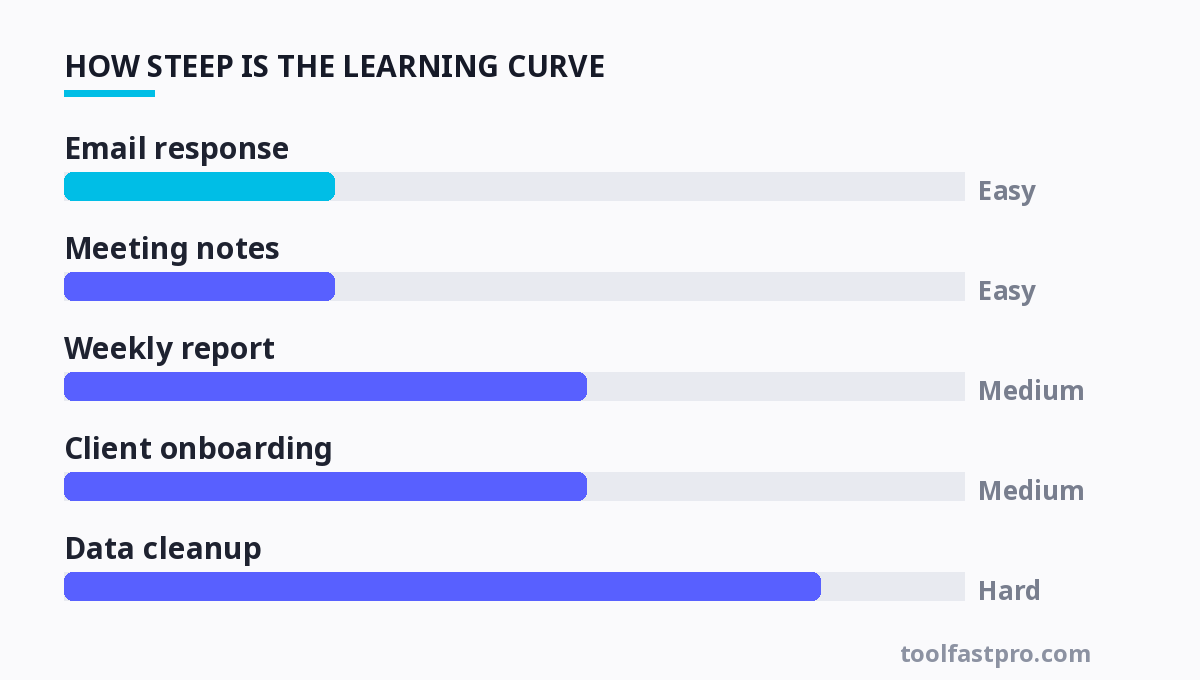
| Template | Time Saved / Week | Difficulty | Best For |
|---|---|---|---|
| Email response | 3–4 hours | Easy | Anyone with a busy inbox |
| Meeting notes | 2–3 hours | Easy | Teams in lots of meetings |
| Weekly report | 1–2 hours | Medium | Managers & ICs who report up |
| Client onboarding | 5–8 hours | Medium | Agencies & service businesses |
| Data cleanup | 3–6 hours | Hard | Sales, ops, finance teams |
For more, check out: .
For more, check out: and workflow templates.
Frequently Asked Questions
Do I need to be technical to build these workflow templates?
No. Start with tools that have graphical builders — Notion AI, Zapier (free tier up to 100 tasks/month, paid from $19.99/month), and Make (free tier, paid from $9/month). All let you chain a trigger to an AI step to an output without writing code. The hardest part isn't technical; it's deciding exactly what steps your process should have and what "done" looks like. Write that down in plain language first, then the tooling is nearly trivial.
How are AI workflow templates different from basic automation or Zapier?
Basic automation moves data and triggers actions — it's deterministic and mechanical. An AI workflow template adds judgment: it generates content, summarizes, or reformats in a way that requires understanding. The most powerful setup combines both — automation handles the trigger and data move, then an AI step does the thinking, then automation routes the result. That's why we talk about workflow templates as the connecting layer rather than either tool in isolation.
What if the AI makes mistakes inside my workflow?
Design for at least one human review point in every high-stakes workflow — especially client-facing output, financial data, or anything binding. Put the review where it costs the least: after the AI drafts, before it sends or commits. For routine internal tasks you can often skip review after you've validated the template a few times. The rule is simple: the more irreversible or expensive the action, the more human gates you keep.
How do I actually get my team to use these templates instead of ignoring them?
Resistance isn't about laziness — it's about friction and trust. Make the template the path of least resistance: put it where people already work, not in a separate tool they must remember to open. Start with the single highest-pain task, prove it works on real work, and show the saved time. Then make one team member the "template owner" who maintains and improves it. Templates that get adopted solve a real, felt pain; templates that get ignored are usually solving a problem nobody actually has.
Ready to go deeper? Our guide to the best AI productivity assistants walks through which tools anchor each template. For teams looking to eliminate repetitive paperwork first, the step-by-step approach in is the highest-ROI place to start. And to make sure you're building these systems on solid fundamentals, our 2026 AI productivity tips covers the habits that keep any workflow template actually working month after month.
Get one practical tool tip a week
Short, useful, no spam. Unsubscribe anytime.